Configure a Wireless Network
Add the following devices in the network topology:
- WRT300N: 1
- Router-PT: 1
- PC-PT: 2
- Laptop-PT: 2
- Switch-PT: 1
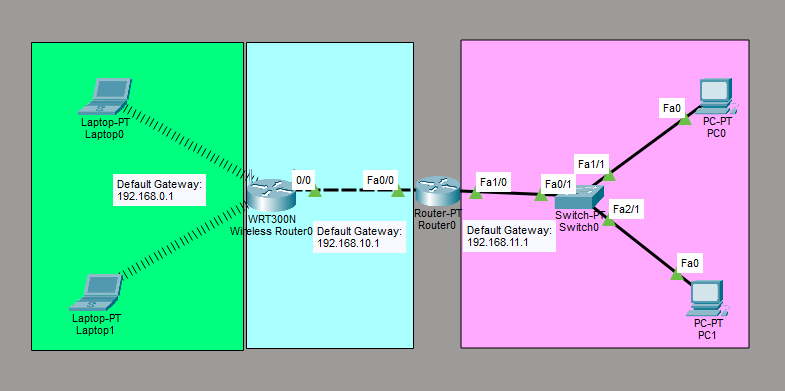
Step 1: Configure the interfaces of Router0
Router0
- FastEthernet0/0
- IP Address: 192.168.10.1
- Subnet Mask: 255.255.255.0
- FastEthernet1/0
- IP Address: 192.168.11.1
- Subnet Mask: 255.255.255.0
FastEthernet0/0:
Router> enable
Router# conf t
Router(config)# interface fastethernet 0/0
Router(config-if)# ip address 192.168.10.1 255.255.255.0
Router(config-if)# no shutdown
Router(config-if)# exit
FastEthernet1/0:
Router> enable
Router# conf t
Router(config)# interface fastethernet 1/0
Router(config-if)# ip address 192.168.11.1 255.255.255.0
Router(config-if)# no shutdown
Router(config-if)# exit
Step 2: Configure the interfaces of Wireless Router0
Wireless Router0
- Internet
- IP Configuration: Static
- IPv4 Address: 192.168.10.2
- Subnet Mask: 255.255.255.0
- Default Gateway: 192.168.10.1
- LAN
- IPv4 Address: 192.168.0.1
- Subnet Mask: 255.255.255.0
Step 3: Configure IP Addresses for the PCs
PC0
- IP Address: 192.168.11.2
- Subnet Mask: 255.255.255.0
- Default Gateway: 192.168.11.1
PC1
- IP Address: 192.168.11.3
- Subnet Mask: 255.255.255.0
- Default Gateway: 192.168.11.1
Step 4: Configure IP Addresses for the Laptops.
Power off the laptop. Replace the laptop's interface, PT-LAPTOP-NM-1CFE, with a wireless interface. Power on the laptop. Repeat the same steps for the other laptops.
Laptop0
- IP Address: 192.168.0.2
- Subnet Mask: 255.255.255.0
- Default Gateway: 192.168.0.1
Laptop1
- IP Address: 192.168.0.3
- Subnet Mask: 255.255.255.0
- Default Gateway: 192.168.0.1